b2c3d
Assets and Lineage
Assets keeps everything a production makes and remembers how each piece was made, inside a production tree of shows, sequences and shots that also decides who can reach it.

Assets keeps everything a production makes, and remembers how each piece was made. Concept images from Concept, masks, scenes and textured scenes from Studio, rigs from Rigging, clips from Animate, and the styles that shape them all land in one library. Each sits where it belongs in the production, and each records the assets it was derived from.
Nothing is lost downstream
The problem this answers is an old one: reopen the original concept art and you have lost everything built from it, because the finished model lives in somebody's downloads folder. Here nothing is overwritten. An operation that changes something writes a new asset with its inputs recorded as parents, and editing a style writes a new version beside the old one, so lineage is a property of the data rather than a convention.

Open the textured noodle cart and Came from walks back, nearest first, through the cleaned scene, the scene and the mask to the concept image. Open the concept and Used by walks forward to everything made from it. They are the same edge read in opposite directions, and every row opens the asset it names. At the top of the chain, the panel says the concept was generated from a prompt, and Open in Concept takes it back with the prompt, style, seed and settings that made it.

The same record makes deleting honest. Before anything goes, Assets shows every version derived from it, and a family is deleted whole or not at all.

One library, shaped by the production
The library shows what sits at the working context and everything above it, so a style placed on the show is offered in every shot, while work in a sibling shot stays out of the way. Filter chips follow pipeline order: image source, segmentation, scene, textured scene, rig, animation and the rest, each with its count. Studio, Rigging and Animate open their inputs from the same library through one asset picker, which leads with what was already made from the asset on screen, so a second copy of an image is never needed.
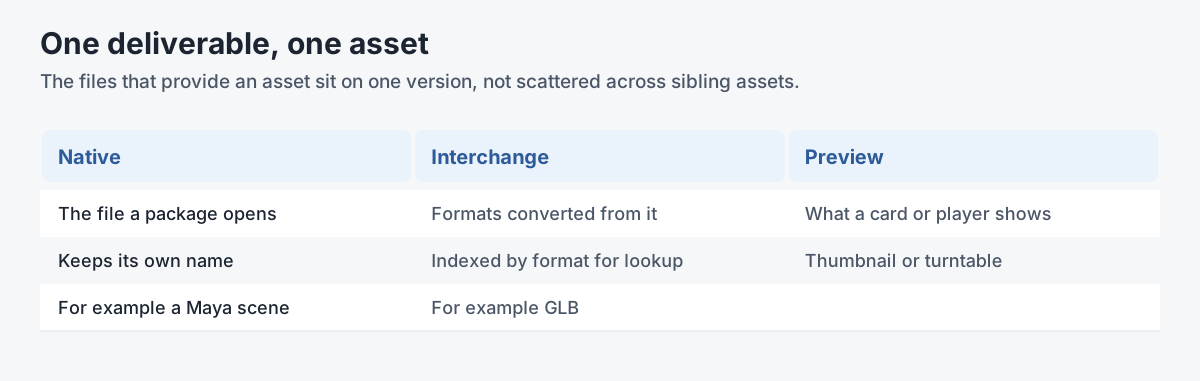
An asset has one canonical file and may have representations, the same content in another format or resolution, which is not another version. A textured scene keeps the six views each object was textured from as extra files beside its GLB.
A file made outside the suite arrives through Import, which asks how it was made: a description, the tools, who made it, and what it was made from. Typing in Made from finds the suite's own work, so an image edited elsewhere and brought back can keep its link to the concept it started as.


Shows, sequences and shots
A production is a tree before it is anything else. The Organizations app holds that tree: a studio, its shows, each show's sequences and each sequence's shots, the way a producer already thinks about a film. Each level has a fixed code for filenames and delivery paths and a name that can change after every story meeting, and a shot can carry its frame range.

The tree is also the access model. A grant on a show reaches every sequence and shot inside it; a grant on one shot reaches that shot and nothing beside it. Access runs downward only, so a freelancer brought in for one shot learns the name of the show and sequence above it and nothing about the shots next to theirs. The server filters before it answers, so a show you were not put on does not appear even as a name.

Roles, review and sign-off
There are five roles: Owner, Supervisor, User, Viewer, and an instance administrator who never appears in a production. Administration is a rank that reaches strictly below: nobody creates or promotes anyone to their own level or above. A Viewer, such as a client's director, can browse, follow lineage, see review state, comment and download, and cannot change anything.
Approvals are opt-in. When an organization turns them on, an artist submits a version, a supervisor approves or rejects it, and only an approved version is published as the one downstream work should take. Each move records who made it. With approvals off, as for a solo creator, there is no review step at all. Artists working in Blender and Maya reach the same library and the same production tree through BigBluePipeline (see Architecture).

Gallery

The same lineage on another production. 
Found by provenance, not by name: the masks already made from the image on screen. 
An import is asked where it came from. 
Shows, sequences and shots, with frame ranges.
Related work
-

BigBluePipeline
A VFX studio pipeline, rebuilt as the artist-side front end for b2c3d.
-
Depth2STL and Obj2GLB
Two small open-source tools for getting 3D data where it needs to go.
-

QIE Studio
An image generation and editing studio, built by an AI agent working unattended from our specification.
-
AuRA Avatar Generator
Customizable, photorealistic presenters for AI-generated video briefings.